CDC Weight-for-Length Growth Chart (45-103.5 cm)
Plot a child's weight against CDC reference data using body length — not age — as the independent variable. The chart displays the standard percentile curves (3rd, 15th, 50th, 85th, 97th) for boys or girls and pins your child's point so you can see whether their weight is proportionate to their length.
LMS Method: Z = ((X/M)^L - 1) / (L × S), percentile = Φ(Z) × 100
How It Works
The CDC weight-for-length chart answers a different question from weight-for-age: instead of asking "how does this child's weight compare to peers of the same age," it asks "how does this child's weight compare to peers of the same body length?" The calculator looks up three parameters from the CDC weight-for-length LMS table — L (skewness), M (the median weight at that length), and S (coefficient of variation) — for the child's exact length in centimeters, regardless of age. It then computes a Z-score using the Box-Cox equation Z = ((X/M)^L − 1) / (L × S) and maps that Z-score through the standard normal CDF to a percentile. The CDC table is indexed at half-centimeter intervals from 45 cm to 103.5 cm, so intermediate lengths are handled by linearly interpolating L, M, and S between bracketing rows.
Example Problem
A boy with a recumbent length of 70 cm weighs 8.5 kg. Where does he fall on the CDC weight-for-length chart?
- Select Boy for sex and confirm the weight and length units (kg and cm in this example).
- Enter the length: 70.0 cm. Note that age is not used — only the measured length matters.
- Enter the weight: 8.5 kg.
- Interpolate the CDC weight-for-length LMS triple for boys at 70 cm: L ≈ -1.356, M ≈ 8.427 kg, S ≈ 0.0797.
- Compute the Z-score with Z = ((X/M)^L − 1) / (L × S). Substituting gives Z ≈ ((8.5/8.427)^-1.356 − 1) / (-1.356 × 0.0797) ≈ 0.11.
- Map the Z-score through the standard normal CDF: Φ(0.11) ≈ 0.54, so the percentile is approximately the 54th.
- Report the result: a boy 70 cm long weighing 8.5 kg sits slightly above the CDC median weight for his length, well inside the healthy band.
Key Concepts
Weight-for-length is a proportionality check, not an age check. A tall 12-month-old who is heavy for her age may be perfectly proportioned for her length; a short 12-month-old who looks average on weight-for-age may in fact be heavy-for-length. The WHO and CDC both treat weight-for-length below the 3rd percentile as a wasting signal and above the 97th as a sign of overweight that warrants follow-up. The measurement used here is recumbent length (lying down) — standing height is about 0.7 cm shorter in the same child, so mixing the two can shift percentiles by 1-2 points. The CDC 0-36-month weight-for-length chart covers lengths from 45 cm to 103.5 cm (about 17.7 to 40.7 in) — notably, the table is indexed by length, not age, so a 4-year-old whose length still falls in this range can still be looked up, though most clinicians switch to weight-for-stature (CDC 2-20) after age 2.
Applications
- Well-child visits: pediatricians check weight-for-length at every visit 0-24 months to confirm proportional growth alongside weight-for-age and length-for-age.
- Wasting screening: a weight-for-length below the 3rd percentile is a primary criterion for acute malnutrition in the WHO IMCI framework, and the CDC chart is used the same way in US clinics.
- Overweight surveillance in toddlers: when weight-for-length exceeds the 97th percentile, the AAP recommends early nutritional counseling.
- Post-illness recovery: weight-for-length tracks whether a child has regained not just weight but proportional weight after illness, hospitalization, or surgery.
- Adoption and refugee intake: when date of birth is unknown or unreliable, weight-for-length gives a pediatrician a usable growth read without needing age.
- NICU graduate follow-up: clinicians confirm that catch-up weight gain is proportional to catch-up length, not just raw kilograms.
Common Mistakes
- Confusing weight-for-length with weight-for-age — they answer different questions; a child can be average on one and outside the normal range on the other.
- Using standing height instead of recumbent length for children under 2 — standing measurements understate the child's length by about 0.7 cm and shift the percentile.
- Entering length in inches without switching the unit selector — verify the unit dropdown matches the measurement before typing.
- Using this chart for a child whose length exceeds 103.5 cm (about 40.7 in) — switch to CDC 2-20 weight-for-stature once the child is being measured standing.
- Treating a single high weight-for-length percentile as a diagnosis — a solidly built child may always sit above the 85th without being unhealthy; trajectory matters more than a single point.
- Mixing charts mid-tracking — once you start a child on CDC weight-for-length, stay on it (and on recumbent length) until the transition to stature-based references to avoid artificial percentile jumps.
Frequently Asked Questions
What is the CDC weight-for-length chart used for?
It is the CDC growth chart that compares a baby's weight to other US infants of the same recumbent length, regardless of age. The chart pulls from US national surveys (NCHS 1963–1994) and covers length 45–103.5 cm. The 50th percentile is the median weight at a given length; values between the 3rd and 97th are considered proportionate, while readings outside that band suggest underweight, overweight, or measurement error.
What is the difference between weight-for-age and weight-for-length?
Weight-for-age compares the child's weight to peers of the same age; weight-for-length compares weight to peers of the same body length. A tall 12-month-old may be at the 90th on weight-for-age but only the 55th on weight-for-length — perfectly proportioned, just larger. A short 12-month-old may be at the 40th on weight-for-age but the 90th on weight-for-length — heavy for her body size even though her raw weight looks average. Pediatricians read both together, not in isolation.
When should I worry about my baby's weight-for-length?
Most pediatricians treat the 3rd to 97th percentile range as the normal band. Persistent readings below the 3rd percentile suggest wasting (acute malnutrition) and above the 97th suggest excess weight. Equally important is trajectory: a baby who was tracking the 50th and drops to the 10th over two visits is a bigger concern than a baby who has been at the 10th all along. Bring any concerns to the pediatrician — a calculator cannot replace a clinical assessment.
Why does this calculator ignore age?
The CDC weight-for-length table is indexed by length only — the LMS parameters are looked up using the measured length in centimeters, not the child's age. This is deliberate: weight-for-length is designed to assess body proportionality independently of age. Age matters for weight-for-age and length-for-age, but not for weight-for-length. If you need an age-based read, use the CDC weight-for-age or length-for-age calculators.
What length range does this calculator cover?
The CDC weight-for-length reference covers lengths from 45 cm to 103.5 cm (about 17.7 to 40.7 in). Most children fall in this range from birth through roughly 36 months, but length (not age) is what determines whether the chart applies. For children whose length exceeds 103.5 cm, switch to the CDC 2-20 weight-for-stature calculator.
Should I measure length or standing height?
This chart uses recumbent length — measured with the child lying flat on a measuring board. Standing height runs about 0.7 cm shorter than recumbent length in the same child, so using a standing measurement here will shift the percentile slightly. If your child is being measured standing (common after about 24 months or once they reliably stand still), use the CDC weight-for-stature chart instead for a clean match between the measurement and the reference.
Are CDC and WHO weight-for-length charts the same?
No. The WHO weight-for-length chart is built from a breastfed international reference sample and is recommended by the AAP for children under 24 months. The CDC weight-for-length chart is built from US national survey data (1963-1994) and is commonly used in US pediatric practice for the full 0-36 month window. Either is defensible — just stay consistent across visits so you are not comparing a CDC point at 12 months to a WHO point at 18 months.
Does ethnicity affect weight-for-length percentiles?
The CDC 2000 charts are drawn from a broadly representative US national sample and are intended as a general US reference. Pediatric growth does show small differences across ethnic groups but the CDC charts are not ethnicity-specific. For populations with substantially different body types, country-specific references (Chinese National, Indian IAP, and others) may fit better.
Reference:
CDC Growth Charts: United States. National Center for Health Statistics, 2000. https://www.cdc.gov/growthcharts/
Worked Examples
Healthy proportion check
A boy 70 cm long weighing 8.5 kg — where does he fall?
A pediatrician is reviewing a healthy-term boy whose recumbent length is 70 cm and weight is 8.5 kg. The CDC weight-for-length chart ignores age entirely — the LMS lookup is purely by length.
- Knowns: sex boy, length 70.0 cm, weight 8.5 kg
- CDC LMS lookup at 70 cm (boys): L ≈ −1.36, M ≈ 8.43 kg, S ≈ 0.0797
- Z = ((8.5 / 8.43)^−1.36 − 1) / (−1.36 × 0.0797) ≈ 0.11
- Φ(0.11) ≈ 0.54
~54th percentile — essentially at the CDC median weight for his length.
A single reading at the 50th percentile is reassuring; pediatricians track whether the child continues along the same channel at subsequent visits.
US-units intake
A girl 25 in long weighing 15 lb at her well-child visit — what percentile?
A parent reports their daughter's length as 25 in and weight as 15 lb. The calculator converts both to the canonical units (25 in × 2.54 = 63.5 cm; 15 lb × 0.4536 = 6.804 kg) before the LMS lookup.
- Knowns: sex girl, length 25 in → 63.5 cm, weight 15 lb → 6.80 kg
- CDC LMS lookup at 63.5 cm (girls): L, M, S interpolated between adjacent half-cm rows
- Z ≈ ((6.80 / M)^L − 1) / (L × S) ≈ 0.17
- Φ(0.17) ≈ 0.57
~57th percentile — modestly above median but well inside the healthy range.
Chart values are for recumbent length — a standing measurement would read about 0.7 cm shorter and shift the percentile slightly downward.
Wasting screen
A boy 80 cm long weighing 9.0 kg — is there a wasting concern?
A toddler presents at a follow-up visit measuring 80 cm long and 9.0 kg. The weight-for-length percentile is the WHO IMCI primary screen for wasting; this calculator uses the CDC equivalent.
- Knowns: sex boy, length 80.0 cm, weight 9.0 kg
- CDC LMS lookup at 80 cm (boys): L ≈ -0.921, M ≈ 10.78 kg, S ≈ 0.0766 (linear interpolation between the 79.5 cm and 80.5 cm rows)
- Z ≈ ((9.0 / 10.78)^-0.921 − 1) / (-0.921 × 0.0766) ≈ -2.56
- Φ(-2.56) ≈ 0.005
~0.5 percentile — well below the 3rd-percentile wasting threshold.
A single low reading warrants a clinical assessment — nutrition, illness history, and growth trajectory together determine whether intervention is needed.
How the percentile is calculated
The calculator turns one pair of measurements — length and weight — into a percentile in three stages. First, it looks up three CDC parameters — L, M, and S — from the CDC 2000 weight-for-length reference table at the child's exact length in centimeters. Age is not used — the independent variable on this chart is length, not time. L is the Box-Cox power transform that accounts for skew in the weight distribution at that length, M is the median weight of same-sex children at that length, and S is the coefficient of variation. Second, it plugs those parameters into the Z-score formula:
Z score equals the quantity X divided by M, raised to the power L, minus 1, divided by L times S.
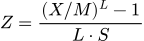
Where:
- X — the child's measured weight in kilograms.
- M — the CDC median weight at that length and sex.
- L — the Box-Cox skewness parameter at that length.
- S — the coefficient of variation at that length.
Third, the Z-score is mapped to a percentile through the standard normal cumulative distribution function, Φ(Z). A Z of 0 maps to the 50th percentile, −1.88 to the 3rd, and +1.88 to the 97th. The CDC weight-for-length table spans lengths from 45 cm to 103.5 cm in half-centimeter steps, so fractional lengths are handled by linearly interpolating L, M, and S between the two bracketing rows. A child older than 36 months whose length still falls in this range can still be looked up — the chart is length-indexed, not age-indexed — though most clinicians switch to weight-for-stature (CDC 2-20) after age 2.
Related Calculators
- Weight-for-Age (CDC, 0-36 mo)
- Length-for-Age (CDC, 0-36 mo)
- Head Circ-for-Age (CDC, 0-36 mo)
- CDC Weight-for-Stature (2-20 years) — for taller children
- BSA Calculator — Body surface area for clinical dosing
- Dosage by Weight Calculator — Weight-based pediatric medication dosing
Related Sites
- Dollars Per Hour — Weekly paycheck calculator with overtime
- Percent Off Calculator — Discount and sale price calculator
- AJ Designer — 200+ engineering and science calculators
- Compare 2 Loans — Side-by-side loan comparison calculator
- CameraDOF — Depth of field calculator for photographers
- Temperature Tool — Temperature unit converter